
Mobile POS app for faster retail billing
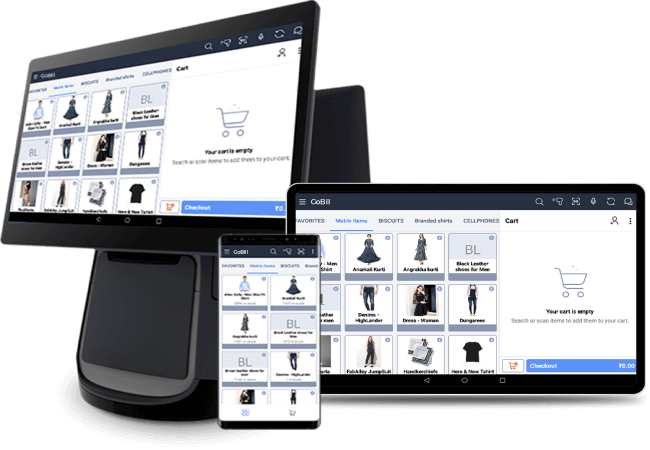
Bill anywhere in your store or on the go. GoBill works offline, syncs with your inventory in real time, and keeps your counters moving even during peak hours.
Trusted by 8,000+
growing businesses across the globe!
Key features of GoBill mobile POS app
Offline billing
Bill without an internet connection. GoBill works fully offline and syncs all transactions the moment connectivity is restored so you never miss a sale.
Barcode scanning
Scan items using Bluetooth scanners or the device camera to achieve faster item entry and fewer errors with no extra hardware needed.
Live inventory sync
Every bill deducts from your live stock automatically. Your inventory is always accurate across every counter and location.
Multiple payment modes
Accept cash, cards, UPI, wallets, credit sales, and split payments. Every tender type your customer may want to use can be accepted in one app.
Session
management
Track cash counter-wise with manager login controls. Know exactly what every till collected, every shift, every day.
GST and
VAT ready
Bill VAT and GST items accurately. Tax structure is built in. Filing is easier when the billing is right from the start.
Why retailers choose GoBill
GoBill is not just a billing app; it is an express checkout counter that fits in your pocket. Here is why retailers across India switch to GoBill.
2-times faster billing
One-touch checkout with barcode scanning cuts billing time in half. Your queue moves faster and your customers leave happier.
Minimal hardware investment
A smartphone or tablet replaces a full billing counter. Save on hardware, electricity, and floor space.
Minimal training required
A simple UI means that any staff member can pick up the software in minutes—no technical background needed.
Bill anywhere
In-store, at a kiosk, at an event, or on the road—GoBill goes wherever your business does.
Zero cash leak
Session management tracks every penny counter-wise so not a single transaction goes unrecorded.
Presenting The Powerful Client register
2x FASTER BILLING
One-touch billing with easy payment options for super fast checkouts
INCREASE PROFITS
Save big on hardware, electricity and retail floor investment and invest only on your inventory
ZERO % THEFT
Monitor cashflow with high accuracy using Session management. Even a single penny of yours won’t be missed!
SELL MORE
Increase walk-in customer count by 2x. Personalize customer shopping experience and ensure 100% satisfaction
Built for every retail business
GoBill works across every retail format. If you sell products, GoBill is built for you.
Made for Successful retailers with New Age Features
Bill Anywhere with Offline Support
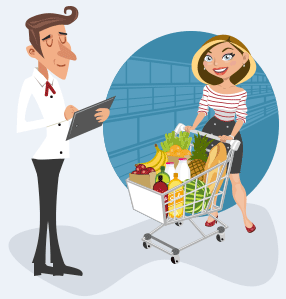
A POS mobile app is a perfect solution for KIOSK stalls, Van sales and gives a great In-Store experience to your customers. Also, Occupies less space in your store with no internet dependency for mobile billing

VAT and GST Support
No matter what you bill, be it VAT or GST items, Mobile billing app gives perfect billing with accurate Tax structure and Eases filing.
Multiple Location and Live Stock Management
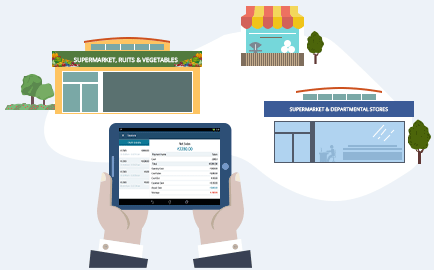
Maintain multiple locations inside your store and do location-wise billing. Livestock enables efficient current stock tracking and achieves the 'Pick and Sell' concept. Take intelligent decisions on the Purchase order and maintain optimal inventory
Session Management
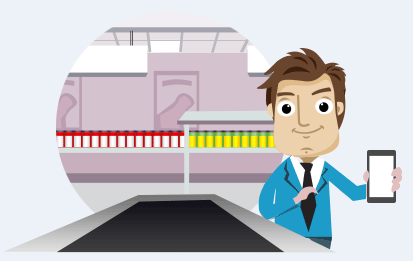
Brilliant Cash handover system allows you to monitor cash flows counter-wise. Also, Sessions allow users to Log in and Log out with the manager's control. Don't miss even a single penny of yours by tracking each transactions from your mobile POS machine itself
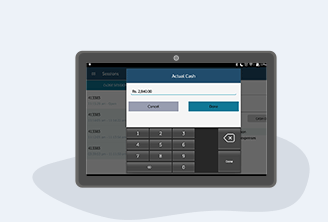
Multiple Tender support
All rounded mobile billing app supporting Cash, Cards, Credit, UPI, and other third Party tenders. Combine two or more payment options and save a Split bill. Express tender and Exact tender make GoBill a handy POS machine.
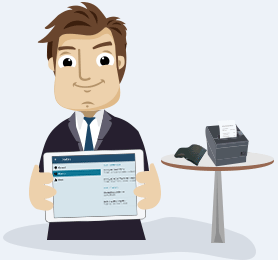
Compact Peripheral Devices
Bar code billing app that delights your customers ON-THE-GO with Bluetooth scanners and printers. POS profile print option is also available to maintain consistent design across all your counters. Setup a billing counter with almost no space occupancy inside the store using POS mobile app with integrated barcode scanner
Integrates with your retail operations
GoBill is an add-on for Gofrugal RetailEasy. Everything you do on GoBill syncs with your main POS, inventory, and reports in real time.
Gofrugal RetailEasy
All bills, stock, and customer data sync with your main POS automatically—one source of truth across all your counters.
Inventory management
Every sale deducts from live stock. Purchase orders and reorder levels reflect billing data in real time.
Bluetooth printers
Print receipts wirelessly from supported Bluetooth and Wi-Fi printers. Check the full list of supported printers available below.
Barcode scanners
Plug in any Bluetooth or OTG scanner. Camera-based scanning is also supported on all Android and iOS devices.
Payment gateways
Integrated with major UPI and digital payment providers, you can accept payments without switching apps.
Weighing scales
Supported with Essae DS-252, you can sell weight-based items directly from GoBill.
Benefits of using a mobile POS app
A mobile POS app does more than replace a billing counter. It changes how your entire store operates.
Try it for your business- Set up additional billing counters without investing in new hardware or real estate.
- Bill customers anywhere in the store, reducing queue build-up at fixed counters.
- Train new staff in minutes with a simple, touch-first interface.
- Monitor cash flow and counter performance without being physically present at the store.
- Expand to new outlets or pop-up locations without additional infrastructure.
- Keep inventory accurate across all counters and locations in real time.
- Accept every payment type your customers prefer, including UPI, cards, and wallets.

A handy app for Quick business. Found it to be a very good tool when dealing with heavy transactions. The design is apt and user friendly
Mr. Abel
- Manager, Beautiful Books Chennai India

Accessories Supported
- Android Specifications
- Version : Android 4.4 and above
- RAM : Min 4 GB RAM
- iOS Specification
- Version : iOS 9.0 and above
- TM-T88V - 3 inch Ethernet printer with Cash drawer
- TM-P20 - 2inch Bluetooth printer
- Essae PR-85 - 3inch Ethernet and USB printer with Cash Drawer
- NGX BTP320 - 3 inch Bluetooth Printer
- BP 201 - 2 inch Bluetooth Printer
- Bixolon SRP 332II - 3 inch USB and Ethernet Printer
- RP80 US 3 inch USB Printer
- RP80 USE 3 inch USB Printer
- TCR070 Android multi-functional POS terminal 2inch printer
- TVS RP3150 STAR - 3 inch Ethernet Printer
- TVS RP3220 STAR - 3 inch USB and Bluetooth printer
- PTP - II 2 inch Bluetooth printer
- PTP-III 3 inch Bluetooth printer
- Blueprints text - 2 inch Bluetooth Printer
- TSC Alpha -3RB - 3 inch USB and Bluetooth Printer
- TSC Alpha -3R - 3 inch USB and Bluetooth Printer
- What exactly is GoBill?GoBill is an add-on mobile/tablet billing app for GOFRUGAL RetailEasy. Instead of billing with computers, GOFRUGAL provides you the ease of billing using an android smartphone or iPad for better convenience. The entire sales module will be replicated in GoBill so that retailers can bill with multiple tills/counters and at the same time with no major investment in hardware, electricity and maintenance.
- Are all the features of Sales available in this handheld billing app?Yes! Most of the major features of Sales module are already available in the product. There are few more feature releases coming your way shortly for you to have a ONE-STOP destination for Sales. Here is a detailed sales feature comparison of GoBill with other POS software.
- Should I be using GOFRUGAL RetailEasy to use GoBill?If you are an existing GOFRUGAL User, GoBill is READY for you. If not, we suggest you to switch to GOFRUGAL RetailEasy and then use GoBill as an add on. Still if you are really happy with your existing POS and want to use GoBill, mail us at sellquick-team@gofrugal.comfor Intergration discussions. But before that, think twice. Are you Happy with the existing POS ? Maybe you should hear what our customers say about us .
- How can I print the bills made in GoBill?There are many possibilities. You can either print from the POS printer or directly from the GoBill integrated printer. There are few recommended ones available in the market - Essae, Posiflex, Epson, NGX etc. GoBill also supports WiFi and USB printing. Checkout our suggested printers here
- Does GOFRUGAL GoBill Support barcode scanning?Yes! We support Barcode scanning. You can either use Bluetooth barcode scanners with GoBill or you can use the In-Built Camera in your mobile/tablet device to scan the barcode items into the cart. This way, you can cut down on your hardware investment even further. Still have thoughts on this? Checkout our suggested scanners here
- I have a large number of Item SKUs, will GoBill perform better?Ofcourse ! We have tested this with 3.78 lakh item SKUs. Even if you have more than 4 lakh items, You should definitely give it a try.
- I am an existing GOFRUGAL customer and use Matrix item combinations. Will GoBill work for me?Yes, you certainly can manage your matrix item combinations completely on-the-go using GoBill.
- What are the recommended hardware specifications for GoBill?It totally depends on your usage and the amount of data. If you are going to bill over 50,000 items, then it is advisable to have a tablet of 4GB RAM. For less than 1000 items, you are good to go with 2GB RAM. The version for Android device should be 4.4 and above and for iOS, it should be iOS 9.0 and above. We always suggest you to go with latest OS version and minimum of 4GB RAM for seamless performance.
- What is meant by session management?Session management is often referred to as a Day-End process. It is a feature helpful for the store managers who want to watch or manage the cash flow in the billing counters. A billing counter is also called a 'Till'. In a store, there may be 'N' number of tills. Each till may be used by more than one person for billing. The user does the billing, collects the payment in his till. When a second user steps in, the previous user needs to hand-over the cash in his till to the manager. Thus with this feature, the manager can have a complete track of every penny that enters and leaves a till and also can take print-outs of session summaries for physical documentation.
- What is Offline Billing in GoBill?Internet connection is not mandatory for billing. Even when the device is not connected to the network, you can continue billing in GoBill. The information will be synced to the POS whenever the connectivity is resumed. This allows you to take this counter outside your retail space and bill anywhere. Quite handy, isn't it?
- Will the billing sequence of GoBill overlap with the server?Not at all! Each counter will have separate billing sequences for worriless Reporting and Accounting.
- What tenders does it support?Delight your customers by accepting multiple tender options like Cash, Credit and Debit Card, Wallets, Coupon Tender, Due Bill, Credit Sales in addition to Split tender (combine two or more tenders for a single bill).
Make use of Exact Tender, Express Tender, Third party payment integration and Payment Grouping for smoother transactions. - Does GoBill support all types of Retail businesses?Absolutely! In addition to supporting standard items, GoBill also supports Kit, Assembly, Serialised and Matrix items and all Medical Item types, making it a perfect solution for supermarket and hypermarket, lifestyle and fashion, hardware and sanitary, electrical and electronics, Pharma and Healthcare and many other retail businesses. Get a FREE TRIAL installed in your smartphone or tablet and experience the benefits of this new-age digital solution right away!
Overview of mobile billing app
What is mPOS (Mobile POS)?
mPOS, or mobile point of sale, is a billing system that runs on a smartphone or tablet instead of a fixed counter. It allows retailers to bill from anywhere in the store, accept all payment types, and manage inventory in real time without investing in traditional POS hardware.
Does GoBill support barcode scanning?
Yes. GoBill supports barcode scanning through Bluetooth scanners, OTG scanners, and the built-in camera on your Android or iOS device. You can scan items directly into the bill without additional hardware investment.
Can GoBill work without an internet connection?
Yes. GoBill supports complete offline billing. You can create bills, accept payments, and manage sessions without any internet connection. All transactions sync automatically to your main
Does GoBill sync with inventory automatically?
Yes. Every bill created in GoBill deducts from your live inventory automatically. Stock levels stay accurate across all counters and locations in real time without any manual entry.
Is GoBill GST compliant?
Yes. GoBill supports both GST and VAT billing with the correct tax structure built in. Bills are generated with accurate tax breakdowns, and data flows directly into your accounting and GST filing workflow.
Why is Gofrugal GoBill considered the best mobile billing software?
GoBill is built on Gofrugal's 20+ years of retail ERP expertise. It works offline, syncs with your main POS in real time, supports every payment mode, integrates with barcode scanners and printers, and requires minimal training for your staff. It handles over 3.78 lakh SKUs and is trusted by retailers across India across every major retail vertical.
What is the importance of a mobile point-of-sale app?
A mobile POS app makes billing flexible, cost-effective, and scalable. It removes dependency on fixed counters and expensive hardware, allows you to serve more customers with fewer resources, and gives you full visibility over cash flow and inventory from any device.
What are the benefits of a mobile POS billing app?
A mobile POS app lets you set up additional billing counters without hardware investment. Bill from anywhere in the store, reduce queues during peak hours, train staff faster with a simple interface, and keep inventory accurate across all counters in real time.
How to download free Mobile POS System and Desktop application from Gofrugal?
You can download Gofrugal's Mobile billing or desktop application by clicking below.
POS mobile app free download